Drivers from HELL Day!

Ok, today must be drive like an idiot day or something! I left for work about an hour later then normal and it started off just a few blocks from my house. Some stupid bitch was blabing on her cell phone instead of going through the green light. Holding up all of the traffic.

Then a couple blocks later some other idiot on a cell phone swerving all over. Then after that another person txting on her cell phone going 20mph under the speed limit. Then I was stopped at a stop light and some woman putting on makeup nearly rear-ends me.

This is all just GETTING to work!

On the way home was much worse.. First there’s construction on Campus just down the street from my office. Some duchebag on his cell phone nearly merges into me because he didn’t look. Then some other idiot tried to turn onto a street that is CLEARLY closed off, causing more issues…..

But the worst one of all was once I got on the freeway, I was cruising along in the fast lane.. Ahead there is traffic, clearly lots of break lights. This woman in a Prius on my right tries making the car pool lane before hitting the traffic, serves violently behind me, nearly rear ending me, gets into the car pool lane but by now has lost control of her car, swerves back and forth pretty hard in the car pool lane all while braking and tires squealing! Then as soon as she gets control again she speeds off into the distance.

Idiots I tell you! PAY ATTENTION!

Mint.com – Manage your money!

A while ago, I stumbled upon a site called mint.com. I signed up for an account, but after that I was leary about submiting my personal info for all my banks to it. So I kept an eye on it and watched the forums. One of the guys here at the office told me he had been using it and really liked the way it worked, then a couple weeks later, mint.com hit the front page of digg.com and there was a very large discussion about the security of such a site.

Come to find out they actually use an outside firm to handle the verification with banks, which is also used by the likes of Charles Schwab, T.Rowe Price, etc. So I decided to sign up. I’ve now been using it for a solid two months and really like it.

They are still technically in a “beta” phase, but who knows how long that’ll last. IE, some of Google’s stuff is in a perpetual beta. Anyways, they have nearly everything I could want in a system like this. The site basically looks at your most recent transactions and imports them from all your accounts. You can then categorize them, exclude them, add notes, create a budget, analyze your spending in categories and over all, search for past transactions, etc. It’s all very very cool.

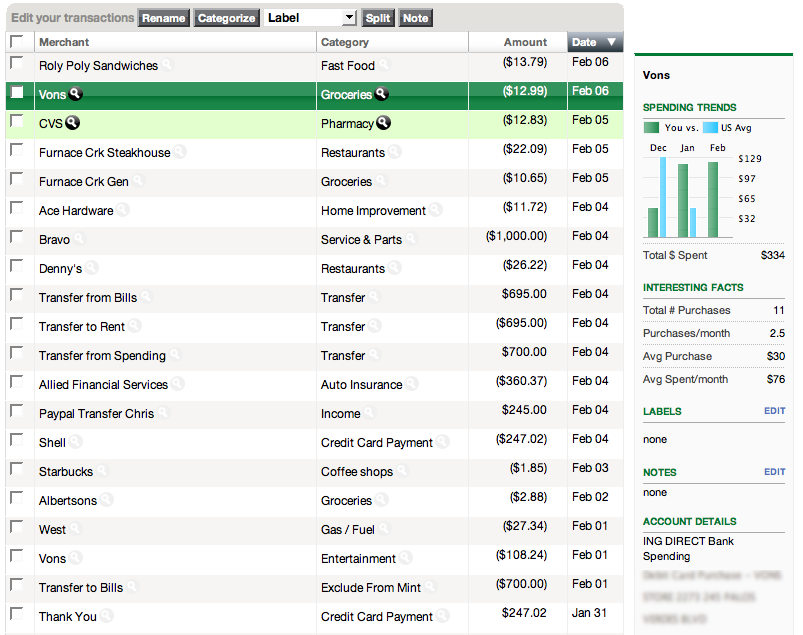
Here’s what the transactions page looks like:

When you click on one of the transactions in the list, it will then pop out a box on the right which will let you enter notes, see details about the expense and some really neat statistics such as your total purchases there, average purchase cost and average spent per month there. It also compares you to the national average for that retailer!

When mint imports a transaction, it tried to automatically categorize it. But you know computers, they are not always right. So you can create rules that certain transactions should always be categorized a specific way. For example, it kept trying to categorize my Gas utility bill as an Auto Gas/Fuel expense, so I created a rule and now it gets it right all the time!

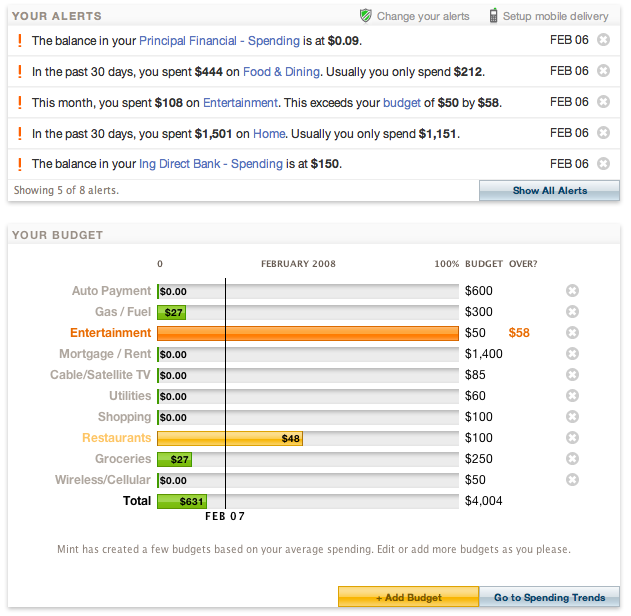
They will even email or txt you alerts when certian things happen. Ie if a large withdrawl is made, or you get close to $0 in your account, when you are close to your bill due date, etc. Here’s what the budget screen looks like:

You can see at the top the alerts that are currently active. You can adjust at what dollar amount each alert goes off at, and even have different alerts and thresholds for your email or cell phone txt alerts! Below the alerts, you can see the budget. The line is where you are in the current month and then you can see how much you’ve spent, what you are over and how much you have left! It’s all very cool. Since we aren’t that far into the month, you can see I haven’t spent very much money. But sadly, I’m WAY over budget already for Entertainment! I guess I’ll be sitting around the house the rest of the month!

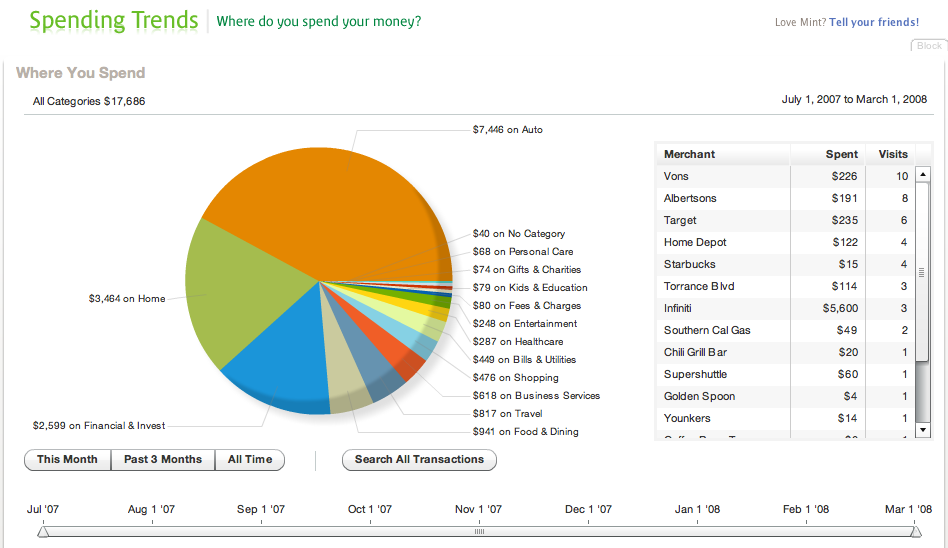
Everyone knows how much I love my statistics. Just look at my Gas Tracker that I have. So Mint.com’s statistics page is one of my favorites! The last couple months have been pretty unusual in spending for me, but with the following image you can really get a feel for how it works.

You can see that each part of the pie is a “Major” category item. Below each of these there can be sub-categories. IE for “Auto” there’s “Gas/Fuel”, “Maint”, “Service and Parts” and “Lease/Payment”. You can click on any of these major categories and it will break it down into the sub-categories, on the right it will then list all the purchase in that category based on the number of visits. You can also select one of the pre-set time periods or you can adjust the slider for your own custom time period.

Lastly, there’s a thing called “Spending Space”. Which is neat app, but not very useful for me. It will show you how your spending compares to America, a select City, or a select State. Here you can see how my spending for Food & Dining compares to California.

It’s a little strange that the spending for California dropped suddenly in Jan, not sure about that. But it’s still kind of neat. Again on this app you can also break it down by sub-category, or even compare yourself to just the LA area!

There have been a few hicups in starting this up. First was setting up my ING bank account. They ask you for SO MANY things that most of them I didn’t even know. Basically they have to ask you for ANY possible question that the bank will throw at them for security replies.

Second is that sometimes a bank will not respond. If this happens. It deletes all the log in information for that account and next time you do an update you will have to re-enter all this information. The good thing is that when this happens, it doesn’t delete the transactions for an account. I haven’t had it happen to much with my major accounts. But one of my credit cards has problems almost every week.

Third is that it only imports what is displayed on the first page of your account history. There’s no way to export from your accounts and then import into Mint. This would be an excellent feature. The forums are all abuzz with requests for this and the typical answer is “We didn’t expect people would want to do this.”… Really? How can you not expect people to want this feature! I have over 5 years of data on my banks website. It’d be awesome to import that into mint and extrapolate my spending trends over all this time!

Fourth, pending transactions can cause some issues. For a while all my pending transactions on ING were entered as credits, not debits. Now they appear to be correctly entering as Debits, but if you categorize them, once they become posted, they loose that categorization so I have to re-enter it, which can be a bit annoying.

Fifth, separation of accounts, I have both a business account and a personal account with one of my banks. However all the transactions are mixed together in Mint. It’d be nice if I could tell Mint that this one account was a different organization and to keep them separate.

Sixth, searching… This really needs some improvement. If you try searching for any category with an “&” in the name, you get NO RESULTS. All of the categories are setup by Mint.com, and you cannot edit or rename them. So trying to find all your transactions with an “&” in them can be difficult.

Lastly, support for IRA, stock accounts, etc. I know these are not considered bank accounts, but if we’re going to have one centralized place to manage money, it’d be nice if these were included…

I’d highly suggest going and checking it out. In case you can’t remember, the URL is http://www.mint.com/.
Update on Grandma

Well. I haven’t yet had a chance to talk to my grandma in person. I’ve called her 3 times on both her room phone and the cell phone, but no answer.

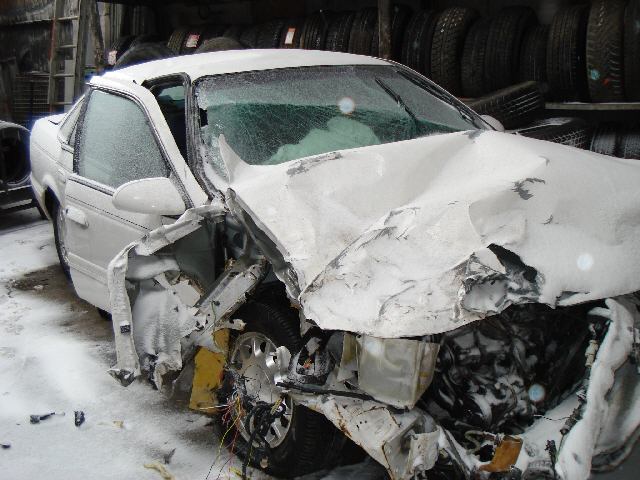
I got an update this morning from my Aunt though. Apparently they got around a foot of snow on Sunday. Apparently she hit a semi tanker truck and the gas tank fell off, so they had to have hazmat come clean it up. The car was towed in after the tow ban was lifted and they are saying it was totaled and that she is lucky to be alive.

Physically she apparently has a lot of bruises, a cut on the nose and her knee is in a brace and is on crutches.

They are getting another 10 inches of snow today so she is stuck in the hospital till someone can get down there to pick her up!

I’m just so thankful that she’s ok!

UPDATE://
Here’s some PICS!


Death Valley!

What a weekend!

Friday night was the typical Dinner with friends. We all met up at Jason’s house and he had Meatballs cooking. However, he was no where to be found! So we made the rest of the dinner and ate it without him. He showed up just as we were finishing dinner. Overall it was a great night. Jason got me a Gift card to Apple for my birthday!

Saturday morning Const and I got up and headed out to Death Valley. On the way there we stopped at Randsburg and Alotia mines. They are both abandoned mines/towns. Very cool. Alotia was the only one that was open for us to really run around in. It’s just amazing to me that RIGHT off the road way are these open pit mines with ladders and stuff still leading down them. We didn’t go down the mines because we didn’t have any safety gear. Perhaps on the next trip we can actually go down them.

From there we headed through some tiny little crazy towns and out to Death Valley. First thing we did was climb the sand dunes which was really cool. Then we headed out to the Badwater Salt flats which is exactly what I was expecting Death Valley to be like. They were sooo cool. We got there right at sunset, so it was really pretty to watch the sunset over the salt flats. I really want to go back there on a full moon night some summer to see how pretty it would be with all the stars and stuff. After that we headed back to the hotel, ate dinner and then went to bed.

Sunday we got up and had breakfast and then headed out to Zabriskie Point which was just a wonderful view of the valley in the early morning. We didn’t stay too long because the wind was CRAZY and it was freezing cold. We headed down the back road from there and stopped at some more abandoned mines. These were really cool and it was a HUGE complex of mines. We went into a few of them, but not very far because it’s very scary with only the two of us and we had very week flashlights. Perhaps when we go back with a bigger group we can do them again. I really enjoyed the mines.

From there we headed down to Dante’s View which was a really cool overlook of the Badwater salt flats we had been at the day before. We headed on down back into the valley and on our way out stopped at an old Borax mine which had been preserved by the park.

There are tons of other things I want to do while there, like Racing Rocks, Scotty’s Castle, and the Crater. But we didn’t have a 4 wheel drive vehicle to take off road. This really does suck with us both having new cars, we don’t want to take them off onto dirt/gravel roads! I was thinking that maybe I can find a truck that I like, or maybe just a cheap user explorer or something that we can take on trips like this.

On the way home I got a very upsetting phone call from my cousin. My grandma was on her way home from Des Moines when she got into some bad snow, lost control of her car and hit a semi head on. Thank god she’s ok. They took her to the hospital because she was sore and they kept her overnight. They were supposed to be doing another CAT scan today but I haven’t heard anything new. I’ve tried calling a few times to her cell phone, but no answer. I assume she’s probably pretty out of it. Just hearing the news made me cry a little, but since I was driving I had to really hold it back. I’m very interested to see pictures of the car though.

The drive home was pretty good though overall. We ran into some REALLY bad dust storms, it was nearly whiteout conditions. And then some rain, but no traffic which was really nice. Got back to my house and the power was out, so we had to make due for a few hours before that came back on.

Today I am working from home. My car is supposed to be done. I sure HOPE that it does get done. I want my car back!

Photos from the weekend are here.

I did the GeoTagging again on this trip and it turned out MUCH BETTER! Download the Google Earth file here, check out the Google Maps Version (without photos) here or check out all the different files here.

New Theme

Last week, one of the guys at my office introduced me to WPRemix. I downloaded it and played with it some. Then, I got a client who wants to use it and change it for the site they are developing. So I had to learn all about it.

In the process, I came up with a new theme for my site. I was able to put this together in 3 days, and even with some very interesting/fun javascript/css to create the curve around the bike wheel.

The theme is a little WIDE for most people I’m guessing. So I’m thinking of ways to shrink that down as it’s currently 1100px wide. I really shouldn’t cause too many issues though because based on Google Analytics most of my visitors are using 1280×1024 screen resolutions.

Anyways, I hope everyone likes it… I hadn’t really been feeling very designy lately, but this surprised me.

Let me know if you see anything broken!